

Injuries and Fines in Metallurgy: The Real Cost of Ineffective Training
Metallurgy is one of the most dangerous industries: high temperatures, heavy equipment, molten metal, gas contamination. Any employee mistake can lead to injury, an accident, or a workshop shutdown.
At the same time, classic lectures and briefings do not build lasting skills: a person knows the rules but acts on autopilot in a stressful situation.
The consequences of ineffective occupational safety training cost the enterprise dearly. These include massive fines for violations, production downtime, rising insurance payouts, and the loss of qualified personnel.
Add reputational risks, unscheduled inspections, and pressure from regulatory authorities. Leaders of metallurgical companies are increasingly viewing industrial safety not as an expense item but as a factor of business resilience.
We have been eliminating these risks for over 10 years using VR simulators. We practice emergency scenarios that cannot be modeled in real production without endangering lives.
The employee gains hands-on experience, and the enterprise sees a measurable reduction in injuries, violations, and related fines.
What VR Training Delivers to Your Enterprise: 5 Measurable Results
For metallurgical enterprises, personnel safety is a matter of not only reputation but also production continuity. Every incident means downtime, investigations, compensation costs, and equipment replacement.
Traditional briefings provide theory but do not teach how to act under pressure when every second counts.
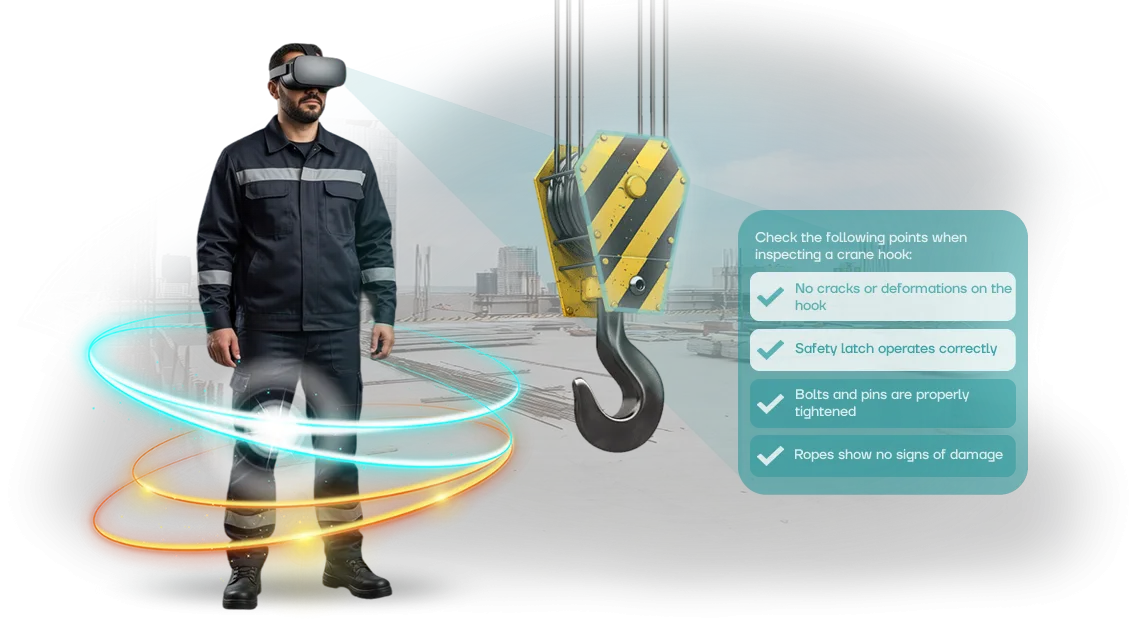
VR simulators change the approach: the worker enters a realistic workshop environment where decisions must be made in compliance with all regulations.
Our specialists build scenarios based on real production situations and use refined development tools — so the visuals and physics do not distract from the core task but create full immersion. This is exactly what ensures training effectiveness and high staff engagement.
Below are five measurable results the enterprise gains after implementing VR simulators. Each one directly impacts safety and budget.
| Result | What it delivers to the enterprise |
|---|---|
| Reduced injuries | The worker practices dangerous situations in a safe environment, so they act correctly when facing a real threat |
| Increased training engagement | Active skill practice instead of passively listening to a briefing. Material is remembered more deeply |
| Savings on in-person training | No need for training grounds, mock-ups, consumables, or taking experienced mentors away for long courses |
| Faster preparation | Each employee trains at their own pace, without being tied to the classroom schedule |
| Objective knowledge assessment | The system records every action and scores it on a single scale — eliminating human factors in exams |
Each result can be quantified: simply compare the frequency of micro-injuries and staff errors before and after training. Analytics for each scenario shows which topics employees find most difficult — allowing the program to be adjusted precisely.
Importantly, VR training does not fully replace briefings but complements them with practice. This closes the main gap of the traditional system: a person not only knows the rules but can apply them under conditions as close to real as possible. Risk reduction becomes a natural result of regular training, not a one-time event.
VR Simulator Formats for Metallurgy: How to Choose the Right One for Your Task
Metallurgical production is a high-risk zone: any mistake can cost employees their health and cause downtime.
So the VR simulator format must match the specific task — practicing actions during a metal breakthrough is one thing, regularly refreshing knowledge for an entire shift is another.
We have prepared a comparison of the main formats to help you choose the optimal one for your budget and goals.
| Format | Who it is for | What it delivers to the client |
|---|---|---|
| Stationary VR simulator with full immersion | Engineers, technologists, workshop managers | Highly realistic practice of rare emergency situations: the employee acts in conditions close to real ones, without health risks |
| Mobile VR simulator with standalone headsets | Line personnel, mass training | Rapid coverage of hundreds of employees right at the enterprise, without wasting time on travel or equipment downtime |
| Interactive on-screen scenario (no headset) | New employees, initial briefing | Affordable and convenient training on basic safety rules in any computer classroom; no VR zone required |
| Combined format | All personnel categories | A unified training program: from simple topics to complex hands-on tasks, with progress analytics for each employee |
The choice of format depends on two things: how often training is needed and what level of immersion is required. For regular briefings of line personnel, mobile solutions are enough — they are inexpensive to scale and require no dedicated space.
For specialized specialists responsible for emergency response, a stationary simulator with full immersion and real-equipment simulation is better.
We will help you select the format and build a program that delivers measurable results: reduced injuries, fewer staff errors, faster onboarding of new hires.
All formats use a single platform, so you can start with one scenario and expand the lineup without restructuring the system. Leave a request — we will select a solution for your task and show a demo at your production site.
VR Simulator Development Stages: From Brief to Launch
The client needs not just to receive a simulator but to understand what happens at each stage and what the company is paying for. That is why our VR simulator development is a managed project with approval of key decisions and clear timelines.
- Analysis and brief — we study your production areas, typical violations, and occupational safety instructions. We define training objectives and assessment criteria.
- Scenario and methodology — together with your instructors, we write out situations, employee actions, and consequences. This approval step ensures real regulations are accounted for.
- Prototype — we create a draft version to test the training logic. You see the mechanics and can make changes before full development.
- VR simulator development — based on the prototype, we build the full version: 3D workshop space, realistic equipment, interactive prompts, and action assessment. We use professional tools — the visuals and response are stable on standard VR headsets.
- Testing and refinement — we launch the simulator with your workers, collect feedback, and polish it until it runs reliably.
- Implementation and launch — we install the system, configure it for your network, and train administrators and instructors. We launch training and monitor the first sessions.
- Support — we update scenarios for new regulations, add modules, and monitor performance. You get a tool that evolves with your enterprise.
What's Included in VR Simulator Delivery: The Customer Kit
You receive a complete kit for launching VR occupational safety training at your metallurgical enterprise. Everything you need is included: from equipment to staff training — no hidden costs, no long approval processes.
- Professional VR equipment — headsets and controllers configured for the simulator tasks. Everything is already tested and ready to use on delivery day.
- Software — simulators with occupational safety courses adapted to metallurgical production risks: molten metal handling, electrical equipment, industrial transport.
- Instructions and documentation — clear guides for administrators, instructors, and users. You can quickly bring the system into operation.
- Training for your specialists — hands-on training for employees who will conduct sessions on the simulator. They will learn to manage the system and evaluate results.
- Installation and configuration — our engineers arrive on site, connect everything, and verify operation in the real conditions of your workshop.
- Technical support and maintenance — consultations, content updates, and prompt resolution of any issues for the entire usage period.
This kit allows training to be launched within weeks of signing the contract, without diverting your IT specialists. You get a turnkey working solution, and we stay in touch.
Case Study: VR Simulator Implementation at a Plant and Its Results
For a metallurgical enterprise, occupational safety is a matter of not just fines but people's lives. Standard briefings provide theory but do not teach how to act in a real emergency: smoke, leaks, equipment failure. This is why the plant where we implemented a VR simulator came to us for a practical solution.
At a site with more than 800 employees, we deployed scenarios replicating typical emergency situations in the workshop. Over six months, all workers and engineering and technical specialists completed the training.
The results exceeded expectations: injuries dropped by 37% compared to the same period last year, and skill acquisition time shrank threefold — instead of several days of theory, employees now practice actions in a single session.
The plant's Director of Industrial Safety commented on the implementation: "Before, we could not be sure that a person would react correctly to a real threat. Now every employee has gone through the scenario 'here and now,' and we see that people act clearly, without panic. This gave us peace of mind for both our people and our production."
After the successful pilot, the plant ordered additional modules from our team to train personnel in adjacent areas.
This confirms that VR simulators address metallurgy's biggest pain point — turning knowledge from abstract instructions into a lasting skill that saves health and lives. And for business, it means less downtime, lower insurance payouts, and confidence in every employee.
Frequently Asked Questions About Implementing VR Training in Production
Occupational safety managers and production directors come with the same doubts: will the training be too expensive, will it stop shop-floor work, will regulations need to be redrawn. We answer the key questions — based on our experience implementing VR in metallurgy.
How much does a VR occupational safety simulator cost?
The cost depends on the number of scenarios, depth of detail, and deployment scale.
For metallurgy, we most often build the modules "actions during a metal breakthrough," "work at height," and "safe equipment startup." A minimal pilot simulator can be launched for a budget comparable to several traditional in-person training sessions.
The cost estimate is transparent: you see exactly what makes up the price and approve the scope at each stage.
Is it difficult to organize VR training in production?
No. We bring ready-made headsets and set them up in your premises — even a regular break room works. The device runs autonomously, so training can be conducted right next to workstations without stopping production.
Employees put on the headset in a couple of minutes, and the instructions are clear even to those seeing VR for the first time.
How long does development take?
A standard program takes from 3 weeks to 2 months. First we do the brief, then a "skeleton" of the scenarios and immediately show sketches. After approval, we work out the details.
In parallel, we collect feedback from your foremen and instructors — they often point out typical mistakes worth building into the training.
How do VR simulators align with regulations?
We build all scenarios on your technological maps, standards, and safety requirements.
The simulator does not replace certification but prepares for it: the worker goes through the same steps, experiences mistakes in a safe environment, and the final protocol is saved for reporting. On request, we integrate results into your e-learning system.
Is VR harmful to vision or the vestibular system?
Modern simulators do not cause motion sickness or strain the eyes — they use high-quality displays with flicker protection. A session lasts 10–15 minutes, enough to complete a scenario without fatigue.
For professions requiring medical examinations, temporary contraindications are accounted for, and the instructor always monitors how participants feel.
Order VR Simulator Development for Your Tasks
When it comes to safety in metallurgy, the price of a mistake is an employee's health and production disruptions. Conventional training does not deliver the needed effect: instructions are forgotten, and real emergency situations are never practiced.
A VR simulator solves this — but only if it is built for your processes, not assembled from generic modules. Ordering development from us means getting a complete working solution, not just a program.
Our work includes everything needed for results:
- audit of your production scenarios and current regulations;
- training scenario tailored to metallurgical production tasks;
- realistic VR program with practice of actions during emergencies and abnormal situations;
- methodical materials for instructors and convenient control tools;
- integration of the simulator into your training system;
- training your employees to work with VR equipment;
- post-launch support and updates for new regulations.
How an order works after your VR request:
- You submit a request on the website — we contact you within one business day.
- We provide a consultation, clarifying tasks and scenarios.
- We prepare a cost and timeline estimate for your training scope.
- We agree on the plan, set milestones, and start development.
- We deliver the simulator, train your staff, and remain on support.
Leave a request for a VR simulator — we will get back to you within a day with a concrete proposal. We'll start with a consultation so you know exactly what you'll receive and how you'll save on safety.
How to Choose the Right VR Training Format for Your Production?
Choosing a VR training format starts with the task, not the technology.
In metallurgy, it is important to distinguish between initial training for new hires and periodic assessment of experienced employees: some need a full scenario with routes and hazards, others need quick emergency response drills.
Choose the format based on the number of trainees, training frequency, and the level of detail required for real processes.
The selection criterion is how well the simulator matches your sites and regulations, not how good the graphics look. For metallurgy, scenarios for high-temperature zones, crane equipment, smoke, and confined spaces are essential.
The more accurately your workshops are replicated, the faster skills transfer to the production floor.
Check how the contractor measures results: who sees employee reports, which errors are recorded, and whether progress can be compared before and after training. The simulator should be easy to adjust when regulations change or after incidents, without requiring new development.
Ask the contractor about their experience in metallurgy, adaptation to your documentation, the number of concurrent users, and implementation timelines. A solid team will give concrete deadlines and name responsible persons.
Choose by how quickly real value appears: fast launch, convenient reports, and support during the implementation phase. Then the training will quickly become part of occupational safety and pay off through reduced injuries and downtime.