

Shipbuilding Safety: Why Briefings Don’t Reduce Injuries
Shipbuilding is one of the most injury-prone industries: working at height and in confined compartments, heavy equipment, constant deadlines.
A shop superintendent knows: even after a perfect briefing, a trainee can get lost at a real machine, and an experienced worker can neglect a small detail that leads to a serious injury.
Why don't regular briefings reduce injuries? Because they convey information but don't build the skill of safe action in an emergency. An employee signs the log, but in a real incident acts at random — only seconds remain for a decision.
VR safety simulators close this gap. Virtual reality makes it possible to simulate equipment failure, a fire in a compartment, a falling load, or a colleague's mistake — and practice the correct response without risking life or stopping production. Training takes place in an environment as close as possible to a real shipyard.
Implementing VR training at a shipbuilding enterprise yields measurable results: fewer injuries and downtimes, lower insurance risks, confident staff actions under a real threat.
At the same time, skill practice takes 30–40% less time than classic workshops, and employee engagement is many times higher than in lectures.
We specialize in VR development for industrial safety and know the specifics of shipbuilding: from working with lifting mechanisms to evacuation from hard-to-reach areas.
We'll help you implement simulators that genuinely reduce injuries, turnkey — from scenario to deployment at the enterprise.
Benefits of VR Training: Engagement, Retention, Safety
At a shipbuilding production site, an error at the workplace can cost health and life, lead to downtime of expensive equipment, and trigger investigations by supervisory authorities.
Meanwhile, traditional briefings and lectures are poorly remembered: after a couple of weeks, workers again violate safety requirements.
A VR simulator moves training into a controlled virtual environment: a person practices dangerous situations in conditions as close as possible to the real shop, but without risk.
What such training gives an enterprise:
- Engagement that slides don't provide. The employee is not passively present but acts: makes decisions, makes mistakes, finds a way out. Interest is maintained throughout the entire scenario, not just the first five minutes.
- Much higher memorability of scenarios. When a worker personally "lives through" an accident or dangerous situation, the correct sequence of actions becomes embedded for a long time. Upon returning to the shop, the skill triggers automatically.
- Fewer injuries and violations. The exact risks present at your production site are practiced: welding, confined spaces, work at height. Employees arrive at the site already prepared for emergencies.
- Training without stopping production. No need to pull people off shifts or stop lines. The VR simulator runs in a training room, and each employee's results are recorded in the system — control is simpler and more transparent.
- A single standard for everyone. Everyone goes through the same developed scenario, so the human factor of the evaluator is eliminated. You get an objective picture of personnel preparedness.
Developing such programs is done by our team: we create scenarios for your shops, equipment, and typical violations, so that training covers the real risks of shipbuilding production.
VR Simulator Formats for Shipbuilding for Any Task
Every shipyard faces the same problem: training personnel in safe work practices takes time, and a mistake on a real site is costly — from material damage to injury.
VR simulators solve this differently: an employee practices skills in a safe environment, and the enterprise gets a predictable result without stopping production.
| VR Simulator Format | For Whom | What It Gives the Customer |
|---|---|---|
| Welder training | Welders, electric/gas welders | Practicing safety techniques and typical operations before site access. Fewer defects and minor injuries. |
| Work at height | Fitters, riggers, maintenance crews | Practicing actions with fall protection and in confined spaces without the risk of falling. The employee arrives at the site already prepared. |
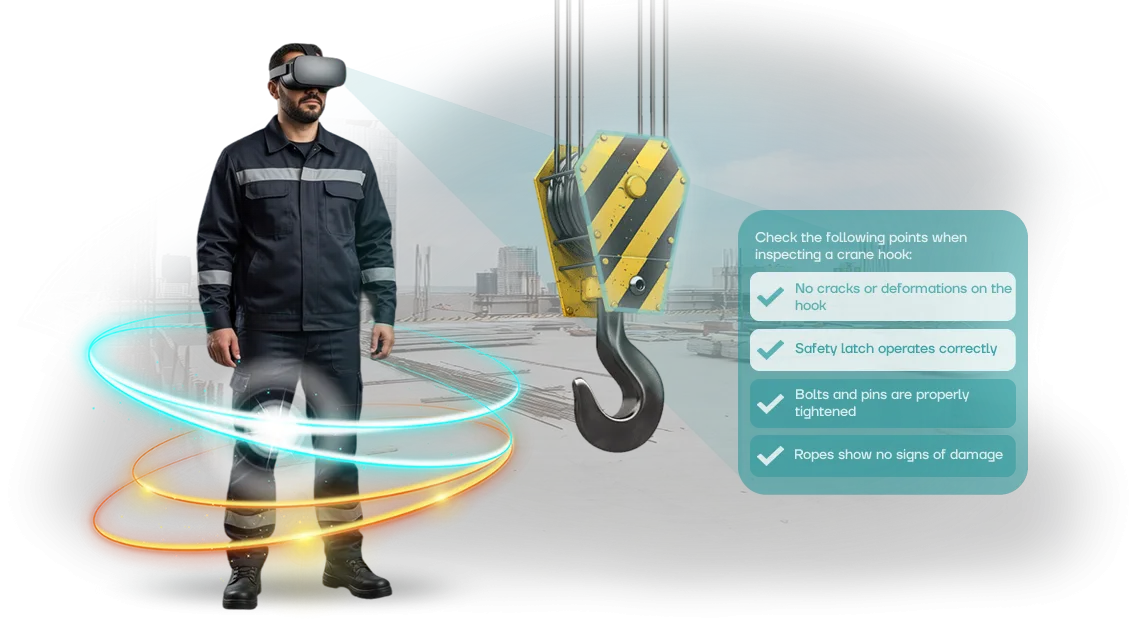
| Slinging and load handling | Crane operators, slingers | Practicing slinging schemes and danger zones. Fewer downtimes due to violations and load incidents. |
| Emergency and accident response | Entire shop personnel | Automatic reaction to an abnormal situation: evacuation, containment, alerting. A manager sees who is truly ready for an emergency. |
Unlike classic briefings, a VR simulator records every action of the employee. The customer receives an objective report: who has mastered the material and who needs a repeat cycle — and can make staffing decisions based on data, not assumptions.
The formats are easy to combine to suit an enterprise's tasks: one equipment set covers welder training, work at height, and emergency response.
We select scenarios according to your regulations and shop specifics, so the training replicates the real conditions of the plant, not abstract situations.
How the Project Proceeds: From Brief to VR Simulator Launch
For shipbuilding enterprises, a predictable process of creating a VR simulator is important — from the first brief to stable operation after launch. Our team have structured the stages so that you see the result at each step and can influence it.
- Brief and task immersion. We study your regulations, typical mistakes, and risk zones. We clarify which skills need to be practiced: from actions during a fire to evacuation from the shop.
- Scenario approval. We show a step-by-step training scenario: situations, interface, scoring of actions. You make edits before development starts.
- Prototype development. We build a working version with key scenarios. It can be tested with a few employees to make sure everything is realistic.
- Full version creation. We fill the simulator with all scenarios and adapt the graphics to your production: equipment, workwear, layout.
- Employee testing. We conduct trial sessions with instructors and workers, collect feedback, and make final edits.
- Launch and support. We install the system, set up workplaces, and train staff. After launch, we remain in touch: we update scenarios, advise instructors, and develop the simulator for new tasks.
This approach removes the risks of misunderstanding: you see in advance what the training will look like and get a tool that integrates precisely into your occupational safety system.
What's Included in a VR Safety Simulator Delivery
When you order a VR simulator for shipbuilding, it's important to understand exactly what you're getting. We put together a delivery package as a ready-made solution: from scenarios to reports — so training starts immediately, without any self-assembly or modifications.
- Scenarios for your tasks — the VR simulator models situations typical for shipbuilding: work at height, in confined spaces, with lifting equipment. Scenarios are adapted to your enterprise's regulations and occupational safety requirements.
- Hardware — virtual reality headsets and all necessary equipment are already configured and tested. You don't need to check compatibility — the solution works "out of the box."
- User and administrator guides — clear instructions for employees and for those who will run the training. The kit includes templates for initial briefing, reminder cards, and action assessment criteria.
- Reporting system — a personal account where you can see who completed the training, how many attempts were needed, and what mistakes were made. This helps control the level of preparedness and address inspector questions.
- Updates and support — we regularly update scenarios and software to keep the VR simulator in line with current standards and process changes. Technical support answers responsible staff's questions.
- Commissioning — our specialists help install the equipment, perform initial setup, and train administrators. You receive a fully ready-to-use kit.
Such a set covers the full cycle: from first demonstration to regular knowledge checks. If needed, the kit can be expanded with additional scenarios or more workplaces — you pay only for what you actually use.
Case Study: VR Simulator Reduced Workplace Injuries in Production
Shipbuilding is an industry where the cost of a mistake is measured in human lives and order delivery deadlines. Work at height, welding in compartments, confined spaces — regular briefings provide theory but don't teach acting under a real threat.
A VR simulator lets every employee repeatedly experience a dangerous situation without risk and bring actions to automaticity.
A clear example is the implementation at the shipbuilding plant Severnaya Verf. We prepared a set of scenarios for welders and fitters: work at height, evacuation from the dock, cleanup of technical fluid spills.
In six months, 300 employees completed the training, and the number of accidents dropped by 40%. The initial briefing time was reduced from two days to four hours.
Results the Customer Saw
The enterprise manager noted not only a reduction in injuries but also an increase in engagement: workers stopped treating training as a formality. Many asked for additional scenarios themselves — for example, practicing actions during a fire in the shop.
Thanks to this, two months after the pilot launch, the plant ordered four more modules — for crane operators, slingers, and painting shop staff.
According to the customer, the savings from prevented downtime and medical examinations paid back the project threefold in the first year.
Why the Project Worked
Unlike standard video lessons, the simulator was built on the enterprise's own real regulations. Employees practiced not abstract scenarios but their own work processes — so after virtual training they acted correctly in the shop as well.
Frequently Asked Questions About VR Simulators: Guarantees and Support
Implementing VR simulators in shipbuilding is a serious step for the occupational safety department.
It's understandable that doubts arise initially: will the equipment break down in the middle of training, how difficult is it to restructure an existing program, and how long will it take to prepare instructors. We answer these questions directly because the goal is to remove customer risks, not add new ones.
What if the VR equipment fails?
The equipment is supplied with a warranty and service support. In the event of a breakdown, we carry out diagnostics promptly and replace the device if necessary, so the training schedule doesn't fall through.
During repairs, the simulators continue to operate as usual, so you don't suspend training indefinitely.
How hard is it to integrate VR simulators into an existing training program?
We handle installation, configuration, and integration with your schedule. The simulators are adapted to your instructions and shop work rules, so employees practice familiar dangerous situations without risk to themselves.
The first launch happens under our supervision, and thereafter the system is easy to maintain with your own safety team.
How do we prepare staff and instructors to work with VR?
We conduct training for your employees: we show how to start a scenario, how to use the equipment, and what to do in an unusual situation. We provide short reminder cards so that new instructors can get oriented even without our presence. Usually one introductory session is enough; after that, the team works independently.
After launch we remain in touch: we provide consultations on operational issues, update scenarios if regulations change, and monitor stable performance. That's why your employees always get up-to-date safety, and a breakdown or program question becomes our task, not your problem.Order a VR Simulator for Your Production
Every project starts with an inquiry. To order a VR simulator, leave a request — we'll contact you within a business day, clarify your tasks, and send a cost and timeline estimate. Already at this stage, you understand what the project will cost and when it will be operational.
After you reach out, you receive:
- A preliminary cost and timeline estimate for your scenario — no hidden fees or "fine print."
- A demo version with your production scenario — you see what the training looks like before development begins.
- Scenario approval with your instructors and occupational safety department — the simulator takes real regulations into account.
- Development and setup of the simulator within 3-4 weeks — with training for your employees and without stopping production.
- Launch of the training program and technical support after implementation — your workers start training from day one.
In the end, you get not a "simulator for show" but a working tool that reduces injury risks and saves time on briefings. Order a VR simulator — we'll calculate the cost, show a demo, and help launch training at your production facility.
How to Choose a VR Simulator Format for Specific Tasks?
Choosing a VR simulator starts not with technology but with the task. Shipbuilding has its own risks: work at height, confined spaces, heavy equipment. These determine which training scenario will bring real benefit rather than remain just a demonstration of capabilities.
The first question is the training goal. If you need to practice an algorithm of actions during an accident, a short interactive scenario with clear steps will work.
If it's more important to instill a culture of safe behavior, a simulation with decision choices and consequence analysis is better. For certification, we design a simulator with error statistics and result protocols.
The second question is the specifics of the site. Shipbuilding production combines different types of work: from assembly shops to work inside compartments. The simulator format should replicate real conditions — lighting, noise, confined space. The more accurately the environment is reproduced, the faster the skill transfers to the real site.
The third is budget and scale. For a single shop, a stand-alone complex with several scenarios is sufficient. For multiple sites, a centralized solution is more logical, where everyone undergoes training under a single program and the manager sees consolidated metrics. We help you choose a format that solves the task without overpaying for unnecessary features.
During a consultation, we analyze your processes and typical violations, then offer two or three formats within your budget. You get a comparison by timeline, scope, and effect, not abstract descriptions of technologies.