

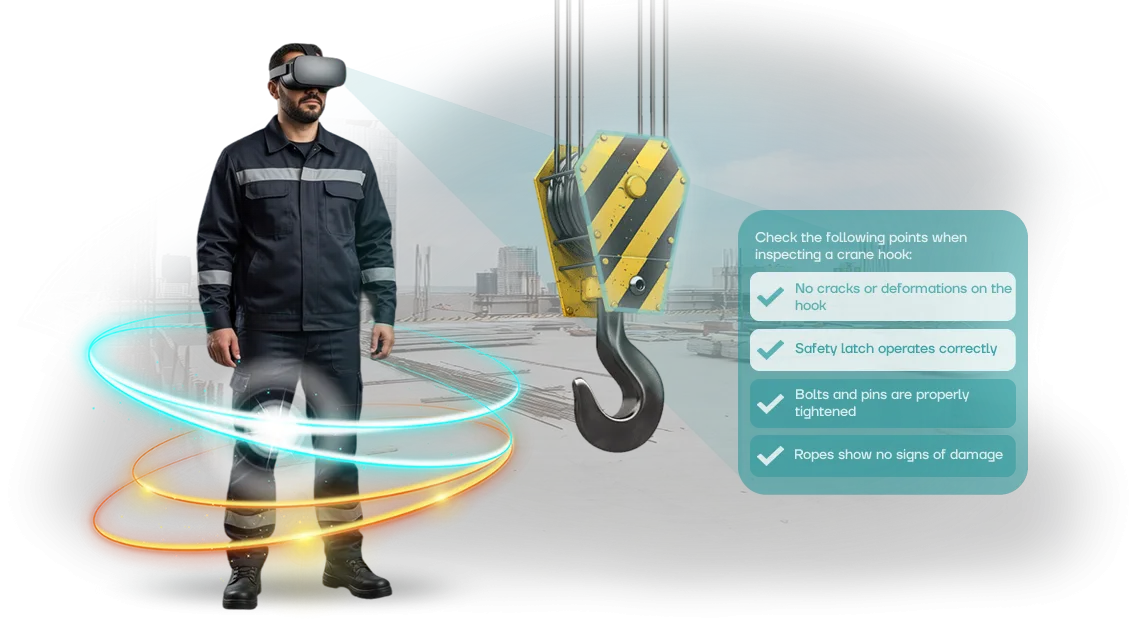
Occupational safety in battery manufacturing: hidden risks
Battery manufacturing is one of the most dangerous industries: chemicals, high voltage, fire and poisoning risks. Most accidents happen not because of missing instructions, but because workers are not prepared to act in an emergency.
They see the real threat for the first time at the moment of the incident, when the price of a mistake is health and life.
Standard staff training — lectures, posters, tests — builds knowledge, but not safe behavior skills. In a stressful situation, a person acts on reflexes, and even employees with excellent scores get lost during an electrolyte leak, smoke, or equipment failure. Formally, occupational safety is observed, but in fact the worker remains unprotected.
For business, this means direct losses: line stoppage, payments, investigations by regulatory authorities, damage to reputation. But risk cannot be practiced in a real production environment — a mistake during training could turn into tragedy. The solution is to simulate dangerous scenarios in safe conditions.
VR simulators immerse the worker in a realistic accident and teach them to act correctly, without risking anything. Staff training ceases to be a formality and delivers measurable results: actions drilled to automaticity, fewer errors on shift, higher worker safety.
Leading factories are already switching to such programs — we help them close gaps that are not visible on paper.
Benefits of VR simulators for employee safety
Occupational safety and economics are usually perceived as different tasks, but in battery manufacturing they are linked: every mistake on the line is a risk to employee health, downtime, and additional costs.
Virtual simulators change the approach to training, turning an employee from a passive listener into an active participant who practices actions in safe but maximally realistic conditions.
Benefit: reduced injuries
Battery production workers deal with chemicals, high temperatures, and heavy equipment. A mistake during a real check without practice can result in injury.
A VR simulator allows safely working through complex and emergency scenarios: the worker learns to act correctly at a critical moment, while the risk of injury during training is completely eliminated. The result is fewer incidents on the line and confidence in every employee's actions.
Benefit: cost savings
Classic briefings require stopping the line, consuming materials, and constant instructor involvement. With a VR simulator, training takes place without interrupting production: the same scenario can be launched repeatedly without spending raw materials on training.
This reduces the occupational safety budget and prevents costs associated with downtime and accident investigations. Our team use professional equipment and proven scenarios, so results are stable from the first launch.
Benefit: employee engagement
People retain knowledge better when they are interested. A VR simulator turns the briefing into a practical task: the employee sees the consequences of their decisions and remembers the correct action algorithm. Engagement is higher than when watching a video or lecture.
Companies report increased material retention — fewer retakes, confident actions in production, and systematic compliance with regulations without reminders.
Implementing VR training solves several tasks at once: reducing injuries, controlling costs, and increasing staff engagement.
Production practice confirms: within just a few months, simulators pay for themselves by reducing downtime, decreasing the number of incidents, and increasing employee responsibility.
VR simulator formats for battery production
In battery manufacturing, the price of a mistake is high: electrolyte spill, short circuit, fire. Regular briefings do not give the employee a sense of real danger or help them remember correct actions.
VR training transfers skill practice into a safe environment where you can make mistakes without consequences and develop actions to automaticity.
But different tasks — from initial familiarization with the workshop to annual certification — require different formats. Our team develop VR simulators for the specific goals of battery production and have compiled the main formats into a table.
| Format | For whom | What it gives the client |
|---|---|---|
| Interactive emergency scenarios | New employees, workshop workers | Practicing actions in case of spill, fire, smoke without real risk |
| Equipment maintenance simulator | Technologists and maintenance personnel | Reducing downtime and errors when setting up lines |
| Virtual on-the-job briefing | Employees before being allowed to start a shift | Quick familiarization with routes, safe zones, and requirements |
| VR certification test | All personnel during knowledge checks | Objective assessment, automatic report, transparency for the commission |
Whichever format you choose, it integrates into your training system and does not require special technical skills from employees. We select equipment and interface to match the user level — from operator to engineer.
If you haven't yet decided which format will deliver maximum effect in your conditions, send us a description of your tasks — we will prepare an implementation plan and a sample scenario for your workshop.
How VR simulator implementation works at your enterprise
Developing a VR simulator for battery production is not an abstract project, but a sequential process in which each step brings you closer to a working tool for your occupational safety department.
We have completed dozens of implementations and know how to adapt scenarios to real workshops, regulations, and risks of your enterprise.
-
Briefing and production analysis. We study your occupational safety instructions, typical violations, and emergency situations. We capture the target employee actions that the simulator should train.
-
Scenario design. Together with your safety specialists, we define the storyline: from initial briefing to emergency response. We work out decision points where the employee makes a choice — and sees the consequences.
-
Simulator development. We model your workshop's workspace: equipment, danger zones, protective equipment. We use professional development tools to make the image realistic and the controls intuitive.
-
Pilot launch. We conduct test training on a group of employees. We collect feedback: whether instructions are clear, whether the virtual environment is comfortable, whether the headset causes motion sickness. We make adjustments.
-
Staff training. We prepare your instructors: we show how to launch sessions, track results, and review employee mistakes. We hand over the admin panel — you manage the trainee group yourself.
-
Going into operation. We integrate VR training into the training plan. Employees complete the course individually or in a group, and you receive a report on each person: completion time, number of mistakes, areas requiring additional training.
-
Support and development. We update scenarios when regulations change and add new situations based on your real incidents. Technical support and refinements — without downtime for your training.
Thus, you get not a "simulator for its own sake," but a ready-made process: from briefing to measurable results in employee safety.
What is included in the VR simulator delivery package
You receive not just a program, but a complete training workstation for employees. The delivery package includes everything needed to launch training from day one, without purchasing anything separately.
We have designed the package so that you only need to appoint a responsible person — and you can start classes.
Here is what is included in the full VR simulator package for battery production:
- VR training equipment — headsets and controllers, ready for use, with a safety margin for intensive use. The number of sets is selected based on the number of employees who will train simultaneously.
- Simulator software — scenarios for your tasks: working with acids and alkalis, charging stations, warehouse storage, actions during spills or fires. Scenario updates are included in the support subscription.
- Administrator workstation — a control panel where you can see who has completed training, how many attempts were needed, and what mistakes employees made. This eliminates manual checking and paper logs.
- Methodological materials and instructions — class procedures, employee reminders, and templates for integrating the simulator into your occupational safety system. Everything is adapted to occupational safety training requirements.
- Commissioning and training for your team — our specialists arrive, set up the equipment, check the connection and premises, and then train your instructor. After that, they conduct classes independently.
- Technical support for the entire service life — remote assistance, equipment replacement in case of failures, and regular content updates to new instructions and safety standards. You are never left alone with the technology.
This package covers the full cycle: from installation to result tracking. You don't need to hire an IT specialist or figure out settings — everything is already done and tested.
Reconfiguring scenarios to your specific workstations and technological processes is also included in support.
If you are unsure what suits your training format, request a demo. We will show you on a real example what a session looks like and help you calculate the package configuration based on the number of employees.
Case study: how VR training reduced injuries at a factory
Battery production is a high-risk area: chemicals, heavy parts, high temperatures. Regular briefings provide theory but do not teach how to act in an emergency.
We moved training into a VR environment, where each employee practices emergency scenarios without risking their health.
Case: battery manufacturing plant
A large battery manufacturer — VolgoBat — contacted us after a series of micro-injuries in the electrolyte filling workshop. Introductory briefings took a lot of time, and new employees still made dangerous mistakes.
We developed a VR simulator that models the most common accidents: acid spill, short circuit, protective interlock failure.
Within three months, more than 300 workers across two production lines completed training. Each employee practiced the scenario for 15–20 minutes, and the briefing was reduced from two hours to a VR session.
Injuries in the area decreased by 40%, and related downtime was cut in half — the factory recouped its investment in the first quarter.
Why the effect proved sustainable
Employees remember not the text of the instructions, but their own actions during an electrolyte spill or fire.
The plant's management received a dashboard with data on who completed the training and how, and was able to close gaps in preparation before workers even reached the line.
After the successful pilot, the factory expanded VR training to all workshops and ordered additional modules for working with heavy equipment. The repeat order was the best confirmation that safety had transformed from a cost item into a tool for protecting personnel and profit.
How to choose the right VR training format for your budget?
The main thing when choosing a VR training format is not the budget size itself, but what task you are solving and how many employees need training. For an enterprise with a few dozen workers and standard briefings, one simple scenario practiced on one equipment set is enough.
But for battery production with hundreds of employees, regular rotation, and specific risks, you will need a whole library of modules and multiple access points.
The key selection criterion is headcount and training frequency. If you conduct initial briefings monthly for 10–15 people, you don't need a complex learning management system — one workstation and 2–3 scenarios are enough.
If training happens weekly and covers different workshops simultaneously, it makes more sense to choose a modular platform that allows you to increase the number of simulators and automatically track each employee's completion.
The second criterion is training goals. It's one thing to practice fire response, another to test knowledge of chemical handling regulations.
Short interactive VR tests are suitable for quick assessment and periodic checks, while immersive scenarios with branching are suitable for practicing complex emergency situations.
The greater the potential damage from an employee's mistake, the more detailed the immersion should be.
The third criterion is implementation timeline and internal expertise. If you need results within a month, choose ready-made scenarios with light adaptation to your regulations. If time allows, order custom development tailored to the specifics of your battery production.
For any of these tasks, we help you choose the optimal format: we capture your input parameters, calculate the required number of workstations and scenario length, and then propose a solution that addresses your specific need without overloading your budget.
Frequently asked questions about implementing VR simulators
Any new training format raises questions — especially in battery production, where the price of a mistake is high and every hour of equipment downtime hits the production plan.
So we have compiled answers to the most common objections: budget, compatibility with current programs, speed of launch, and staff requirements.
How long does implementing a VR simulator take?
A typical project takes from two weeks to a month — from briefing to the first ready scenario. A pilot version can be launched even earlier and expanded gradually. The simulator does not replace existing briefings; it complements them with safe practice.
What budget is needed for such a project?
We select a configuration to match the enterprise's tasks: start with one scenario, practice it with a pilot group, and evaluate the result. This approach allows you to start with minimal investment and scale up once training proves its effectiveness.
Will I need to buy additional equipment?
A modern computer and a virtual reality headset are enough — we set up the rest ourselves. Our specialists integrate the simulator with internal training materials and the knowledge control system without stopping production. Employees master the controls in a couple of hours.
How difficult is it to train staff to work with VR?
The user only needs basic skills: prompts appear right inside the scenario. The employee puts on the headset, performs actions, and receives feedback in real time.
After 15–20 minutes, they are confidently working in the simulation, and the instructor only needs to review mistakes.
Who is responsible for results and support?
We support the project at all stages: from scenario development to launch and subsequent updates. The warranty on work and technical support are specified in the contract, so you always know who to contact.
Before proposing a solution, we study your regulations and training programs. This allows us to accurately calculate timelines and scope of work — you receive a clear proposal without hidden conditions or surprises after launch.Order VR simulator development for your enterprise today
What do you need to do to order a VR simulator for your production? You submit a request, and we take on the entire journey — from idea to a working solution that integrates into your training system.
No complex technical preparation is required from your side: specialists will select the scenario, conduct filming or modeling of your workshop, and prepare the program for specific workstations.
You can start right now — simply fill out the form on the website. Here is what our turnkey development process looks like:
- Request and consultation. You describe the task — we contact you within one business day, clarify details, and answer questions.
- Audit and scenario selection. We study occupational safety instructions and typical errors at your production, propose a simulator scenario — from practicing fire response to equipment operation algorithms.
- Design and approval. We develop the concept and cost estimate, and agree on scope and timelines with you.
- Simulator creation. We model the virtual workshop, add realistic situations, and an employee action assessment system.
- Launch and support. We install equipment, train your instructors, and help integrate the simulator into the training plan.
After launch, we stay in touch: we update scenarios — just write to us if you add new areas or workstations.
Why you should start now:
- Quick start — consultation and preliminary estimate as early as the next day after your request.
- Turnkey development — no need to search for contractors piece by piece; one team manages the entire project.
- Adaptation to your production — the simulator reflects your specific workshops, equipment, and regulations.
- Transparent terms — we fix timelines and budget before work begins.
Leave a request to discuss your task with our specialist and receive an implementation plan for your enterprise. Tell us which areas and professions need to be covered — we will propose a solution within one business day.