

Why Foundry Production Loses Profit Due to Injuries and Fines
Foundry production is one of the most injury-prone industries. Working with molten metal, high temperatures, heavy equipment, and constant noise creates risks at every stage. A single accident can halt the workshop, disrupt delivery deadlines, and lead to major fines. Yet these losses can be prevented.
However, costs are not limited to fines. Insurance premiums rise, you have to pay for employee replacement, and time is lost on investigations.
After an incident, unscheduled inspections arrive — and even if there are no serious violations, inspectors find a reason to issue an order. As a result, profit that could go toward equipment modernization or team bonuses instead goes to dealing with the consequences.
The root of the problem is human error. Employees do not violate regulations out of malice — they simply fail to notice the danger or act out of habit.
Classic safety briefings and posters do not deliver the desired effect — information is quickly forgotten, and on a real production floor an error can cost too much.
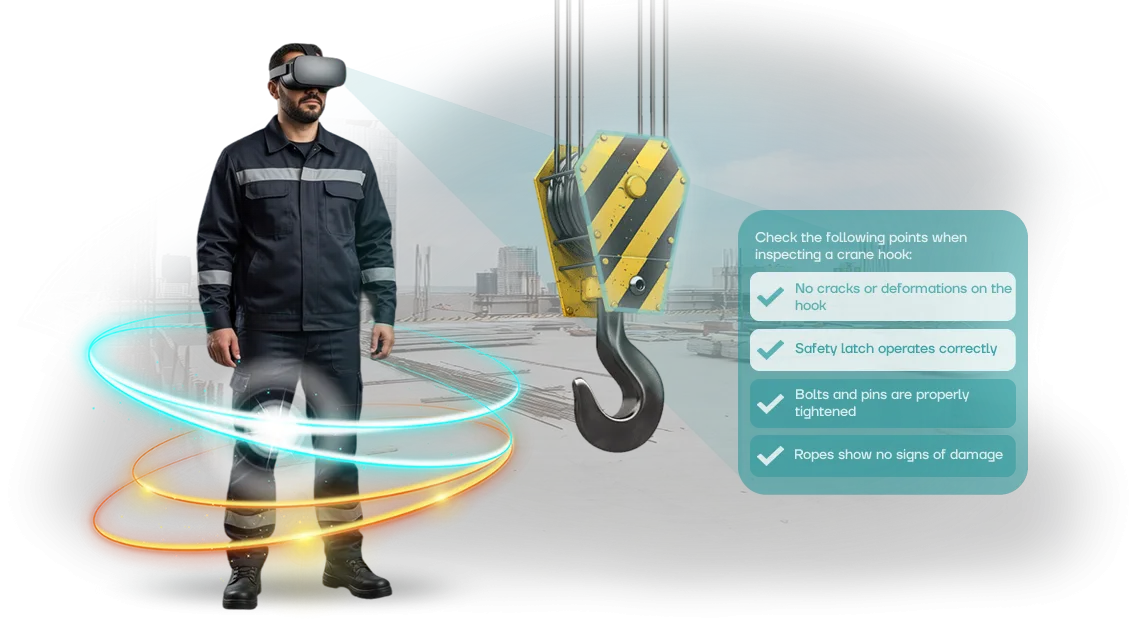
That is why we develop VR simulators for foundry enterprises. In a safe virtual environment, workers encounter realistic situations: from working with a ladle to responding to an emergency.
They learn to make the right decisions without risking their health and without halting production. This training format reduces injuries, lowers the number of fines, and ultimately preserves your profit.
What Implementing VR Simulators for Plant Safety Will Bring
On a foundry production floor, risks are always higher than the industry average: hot metal, smoke, heavy equipment, and strict regulations.
A new employee's mistake or an experienced operator's lapse in attention results in injury, line downtime, and attention from regulatory authorities.
VR simulators allow practicing dangerous scenarios without real risk — a worker gains hands-on experience that cannot be delivered in a lecture or a standard briefing.
According to the International Social Security Association, hands-on training in a virtual environment improves retention of safety algorithms by 2–3 times compared to traditional materials.
For a plant, this means fewer incidents caused by the same reason: the employee does not just listen to rules but experiences the incident, sees the consequences, and remembers the correct response.
Implementing VR training directly impacts the workshop's economics. Fewer injuries mean lower costs for compensation, sick leave, and equipment downtime. Fewer inspection orders mean fewer fines and less risk of work stoppage.
And by practicing emergency response, the team reacts faster and more confidently: response time decreases, which prevents an incident from escalating and avoids additional losses.
Safety culture also grows: employees stop perceiving rules as a formality. After a VR session, they themselves name hazardous factors at their workstations and suggest improvements.
Managers receive objective statistics on each worker — who has absorbed the material and who needs repeat training. Occupational safety becomes a manageable process rather than a set of paper instructions.
These results are achieved on professional equipment and refined scenarios adapted to the real tasks of foundry production.
We design simulators based on your regulations, layouts, and typical situations — so training addresses your specific risks and delivers measurable results right after launch.
VR Simulator Formats for Foundry Production
In foundry production, every stage — from metal melting to centrifugal casting — requires clear safety algorithms. A mistake is costly: the risk of injury, equipment downtime, and regulatory fines.
VR simulators allow practicing actions in a safe virtual environment where consequences do not affect real production, and skills are reinforced faster than when reading instructions.
We offer three basic VR training formats for occupational safety in foundry workshops. They cover the main needs: from initial onboarding to verifying staff readiness.
You can choose one format or combine them to suit your task — scenarios are easily adapted to specific equipment and regulations.
| Format | Target Audience | What It Delivers to the Client |
|---|---|---|
| Simulation of typical situations | Operators, maintenance personnel, machine setters | Practice of emergency response without risk to people or equipment; fewer errors in real work |
| Equipment operation training | New employees, trainees, employees changing job category | Faster mastery of work algorithms on casting machines, furnaces, and cranes; shorter initial onboarding time |
| Performance assessment | Occupational safety specialists, area supervisors | Objective verification of employee knowledge and skills; result protocols for monitoring and certification |
How VR Training Launch Works at Your Enterprise
Launching VR training does not require halting production: the entire process takes from two weeks to a month depending on the number of scenarios.
We manage the project turnkey — from the first brief to post-implementation support — so your team does not need to deal with technical details.
- Brief and workplace audit. We study the specifics of your foundry workshop, collect incident data, analyze current occupational safety instructions, and identify the most frequent employee errors.
- Risk and scenario analysis. Together with your specialists, we identify hazardous operations: molten metal pouring, crane operation, furnace maintenance. At this stage, we determine which situations employees should practice first.
- Scenario development. We create virtual situations based on your regulations and the ISO 45001 standard. Each scenario is approved before deployment — you review and adjust the content before employees see it.
- Equipment installation and setup. We deliver VR kits, connect them, and test them in your facility. Training is integrated into the existing briefing system without replacing working tools.
- Pilot launch. We run the program with one group of employees, collect feedback, and adjust task difficulty and prompt texts if needed.
- Full deployment. We train your administrators to independently assign tasks, track progress, and view results for each employee.
- Support and updates. After implementation, we stay in touch: we update scenarios when production processes change, add new situations, and help with reports for inspections.
In the end, you get a ready-made tool that quickly integrates into the regular work of the occupational safety department and provides clear data on every employee.
What Is Included in the Delivery of an Occupational Safety VR Simulator
For foundry production, a VR simulator is not just goggles — it is a complete kit that can be put to work within the first weeks.
All equipment, scenarios, and methodological materials are tailored to occupational safety tasks at your site, so you will not need to refine or purchase anything extra. We handle setup and staff training — all that remains is to schedule the briefing date.
What is included in the delivery:
- VR training equipment — virtual reality headsets and motion tracking sensors designed for intensive use in a training classroom. A simple mounting system and a wear-resistant body allow the kit to be used daily without frequent repairs.
- Software with a simulator tailored to your workshop — real foundry production areas are modeled: melting furnaces, pouring lines, casting zones, and crane movements. Employees are placed in a familiar environment, so skills transfer more easily to real work.
- Occupational safety scenario library — working with molten metal, using PPE, responding to spills and smoke, evacuation, and hazardous zone control. Scenarios match typical foundry risks and the requirements of occupational safety instructions.
- Occupational safety instructions and methodological materials — short reference cards for employees, checklists for instructors, and recommendations for conducting sessions. Everything is provided in print and electronic form and is easily adapted to your regulations.
- Training for your specialists — we conduct a training session for instructors and administrators: we show how to launch sessions, monitor trainees' actions, review mistakes, and generate reports for certification.
- Warranty and support — technical support, software updates, and, if necessary, scenario refinement to reflect changes in production processes or new requirements.
Each delivery item addresses a specific client need: equipment works immediately after installation, the program comes pre-loaded with scenarios, and your employees receive ready-made instructions.
The result is a training system that reduces injuries, increases staff engagement, and quickly pays for itself by cutting downtime and the costs of traditional onboarding.
Case Study: Reducing Injuries at a Plant with VR Simulators
In metallurgical production, high temperatures, heavy equipment, and constant risk mean the price of a mistake is measured in employee health and downtime.
The plant we worked with faced a typical problem: newcomers made errors during their first weeks on the job, and onboarding did not provide the necessary depth of immersion.
Injuries occurred due to haste and inattention, and every incident meant workshop stoppage and investigations.
We proposed replacing part of the theoretical training with VR simulators. Employees practice hazardous situations in a virtual environment: falling loads, smoke, equipment failure — everything that cannot be safely simulated in a real workshop. Training takes place without risk but with a full sense of reality.
Implementation results at the plant:
- Injuries at the site decreased by 40% in the first year — that is dozens of days saved on sick leave and downtime.
- New employee onboarding time was reduced by 30%: the simulator allows practicing scenarios in 2–3 hours instead of a week of hands-on practice.
- Material retention improved — employees remember emergency procedures better than after traditional onboarding.
The secret is that a VR simulator cannot be "sat through." A worker physically goes through the situation, makes decisions, and sees the consequences. This builds muscle memory and confidence that stay with them in the real workshop.
The client was satisfied: the plant extended the contract for the next year and expanded the program to other sites. For us, it matters that results are measured not in enthusiastic reviews but in safety numbers — and they speak for themselves.
Want your employees to return home healthy? We will show you how to adapt this experience for your production.
Frequently Asked Questions About VR Training for Occupational Safety in Manufacturing
When implementing VR simulators in foundry production, the most common questions are about cost, compatibility with existing regulations, and the complexity of launch. We understand these concerns: occupational safety training must be predictable and must not create new risks. Below are answers to typical questions, including what to do if the equipment fails.
How much does it cost and when will it pay off?
The exact cost is calculated after an audit based on your list of scenarios and number of employees, but it is always lower than the consequences of a serious accident or extended downtime.
A VR simulator pays for itself by reducing injuries, cutting downtime, and accelerating initial onboarding for new workers.
Will we have to change equipment in the workshop?
No. The headsets are standalone and do not connect to machinery, so current production processes remain unchanged. The equipment is easy to move between sites, and scenarios are adapted to your instructions and safety regulations.
How difficult is it to implement the training?
Implementation is phased: scenario audit against your regulations, setup, and pilot testing with a small group. Employees complete a scenario in 15–20 minutes without stopping the workshop, and launching a standard solution takes one to two weeks.
What if the equipment breaks down?
The devices are designed for intensive use, but if a failure occurs, we will provide replacement equipment for the duration of the repair and fix the issue under warranty. Training will not be interrupted for a single day.
How to Choose the Right VR Simulator Format for Your Production Tasks?
Choosing a VR simulator starts not with technology but with questions: how many employees need training, what risks are specific to your foundry production, and what budget is allocated for training.
The answers determine whether you need a mass format for all workers or in-depth scenarios for key specialties.
The number of employees is the main criterion for choosing a VR simulator. If hundreds of people need training, it is more rational to use short modules and several headsets to keep the flow moving.
For a small group of operators, longer scenarios with emergency situation analysis may be more appropriate. This way, you get the training speed you need without overpaying for unnecessary volume.
The types of risks determine the content of scenarios. For a foundry workshop, these are burns, electric shock, and work with lifting mechanisms.
A proper VR simulator models the exact emergency situations that occur at your facility rather than abstract examples — this keeps training tied to real production safety.
Budget is the third key selection criterion. The cost consists of scenario development and equipment, so for a limited budget, a starter set of two or three modules is sufficient. At the same time, a VR simulator pays for itself by reducing injuries and downtime. If you are unsure, we will run a pilot launch and select the optimal configuration for your tasks.
Discuss Your Project and Get a VR Training Implementation Estimate
Implementing VR simulators in foundry production is not buying "a box" — it is a project that must reduce risks and pay off.
The right way to start is with a short conversation: we will discuss your tasks, show working scenarios for foundry workshops, and help you understand which format suits you best.
Submit a request for VR training — we will contact you within one business day and prepare a preliminary cost estimate. The consultation is non-binding: you will get numbers, a plan, and answers to your questions, and the decision remains yours.
What you will receive after contacting us:
- A preliminary cost estimate for your scenario — no hidden surcharges or "surprises" in the budget.
- An implementation timeline assessment: from the first demo to launch at your site.
- Scenario recommendations for foundry production: working with molten metal, smoke response, evacuation, and emergency actions.
- Demo access to ready-made modules so you can personally assess the realism and usability of the training.
- A plan for integrating VR simulators into your briefing program and knowledge control system.
- Post-launch support: employee training, scenario updates, and technical support.
Imagine your employee encountering an emergency situation for the first time not in the workshop but in a safe virtual environment. VR training reduces injuries, shortens onboarding time, and increases staff confidence.
Let yourself see how this works in practice. Submit a request for a cost estimate — we will call you back, answer your questions, and help you make an informed decision.