

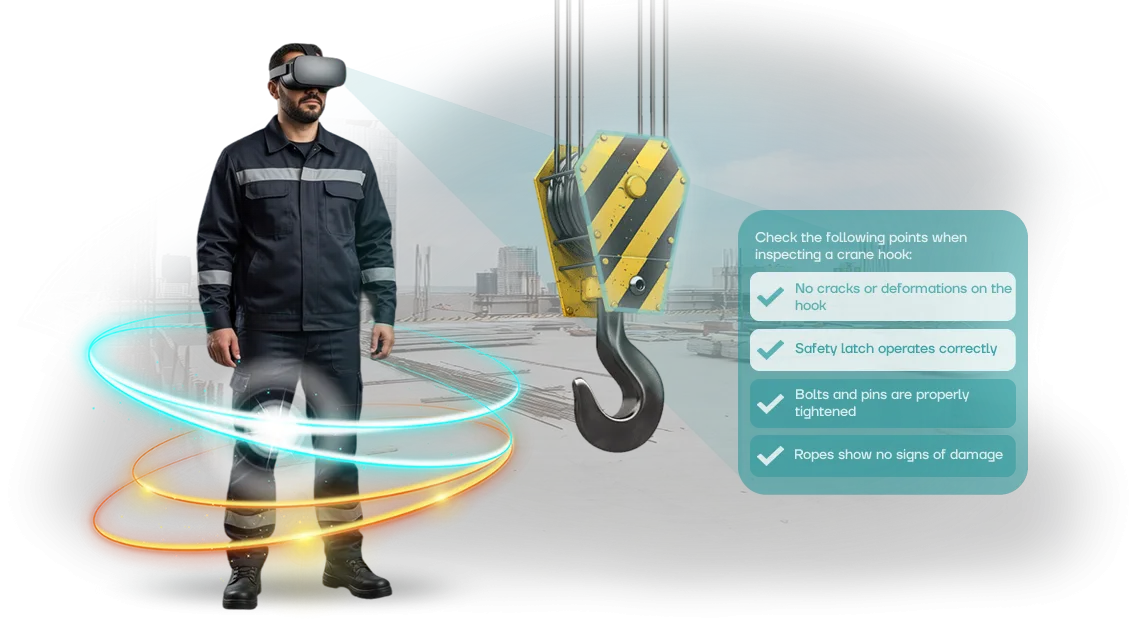
Occupational Safety in Manufacturing: Why VR Training Is Becoming the Standard
Every year, workplace accidents that could have been prevented occur in manufacturing. Traditional safety training relies on lectures, briefings, and tests. Employees often go through them formally, and within a week the knowledge fades.
The cost of a mistake on real equipment is injuries, line downtime, and inspections from regulatory authorities.
Virtual reality is changing the approach to industrial safety. An employee immerses themselves in a realistic model of the workplace and handles dangerous situations on their own — fire, leaks, equipment malfunctions.
A mistake on the simulator doesn't harm health, but it provides invaluable experience that stays in memory.
VR simulators allow practicing actions until they become automatic in scenarios that cannot be created at a real facility without risk. Employee training becomes visual, engaging, and practical.
Instead of formally sitting through a briefing, a person experiences the situation and remembers the correct procedure at the level of habit.
Managers get a team with solid safe-work skills and measurable training results. Each employee works through scenarios, confirming their competencies in a virtual environment.
This reduces the number of violations and creates a safety culture that ultimately lowers the costs of incident response.
That is why VR safety training is becoming the standard for modern manufacturing. It solves the main problem of the traditional approach — the disconnect between theory and practice — and makes safety part of daily work.
What a VR Simulator Provides in Safety Training
Instead of "sitting through" an hour-long lecture, an employee experiences a dangerous situation with their own hands: they see the consequences, make decisions, and receive immediate feedback.
Safety training stops being a formality — it actually changes a person's behavior on the production floor.
Engagement is the first thing managers notice. Virtual simulators hold an employee's full attention: they aren't looking at their phone or "checking out" of the topic — they're acting within the scenario.
This is especially important for experienced workers who believe they "already know everything."
Retention increases significantly. According to statistics, after a month a person remembers only a tenth of what they heard — but if they performed the actions themselves in conditions close to real, the knowledge stays with them for a long time.
An employee returns to their work area, sees a similar situation, and automatically chooses the safe option.
Risk reduction is the natural outcome. Mistakes that could cost someone their health in the workshop are consequence-free in the simulator, but they leave an emotional imprint.
The company reduces violations, micro-injuries, and downtime, while the safety department gets better-prepared staff.
Training effectiveness is also visible in numbers: faster material absorption, fewer repeated briefings, higher scores during audits.
The same simulator scales to all shifts and branches, so every group of employees receives equally high-quality training — regardless of instructor fatigue or lecture format.
VR Simulator Formats for Manufacturing: Choosing Based on Your Task
Every workshop follows its own rules: somewhere the priority is emergency response, somewhere it's the operating procedure for equipment, and somewhere it's evacuation in case of smoke.
There is no universal simulator, so we divided training into formats — from short scenarios to full-fledged courses. You choose based on the task rather than fitting the task to the format.
A short scenario — 5–7 minutes — drills one specific action: proper machine lockout, PPE check, signaling a detected leak. A medium format — 15–20 minutes — includes several interconnected steps and typical errors.
A full course is a series of sessions with progress tracking and a final knowledge check, integrated into the shift schedule.
| VR Training Format | Who It's For | What It Provides to the Client |
|---|---|---|
| Short scenario (5–7 min) | Mass onboarding, new employees, pre-shift refresher checks | Quick coverage of the entire shift, minimal time away from work |
| Multi-stage training (15–20 min) | Workers in high-risk areas, maintenance personnel, operators | Practicing the full sequence of actions and responding to deviations |
| Full course (series of sessions) | Site supervisors, occupational safety engineers, training managers | Systematic training with recorded results and error analysis for each employee |
We'll advise which format and scenario fits your workshop — we'll account for the layout, equipment specifics, and typical violations. The simulator works as a standalone training stage or supplements your current briefings without disrupting the usual schedule.
How VR Simulator Development Works: Step by Step
We start development after analyzing your production specifics and typical risks. You receive a clear plan: what we model, which scenarios we drill, and how we verify the results.
You don't need to dive into technical details — you control each stage by deadlines and can review intermediate versions.
Here is the step-by-step process:
- Brief and workplace analysis. We collect regulations and typical employee errors. We identify the critical skills for your production.
- Scenario and training methodology. We design situations from standard operations to emergency shutdowns. We define evaluation criteria — what's correct and what's a violation.
- 3D modeling of your facility. We create a digital twin: the same machinery, tools, and signals. The employee is placed in a familiar environment, not an abstract one.
- Building interactive scenarios. We script the responses: a mistake gives immediate feedback and lets the user try again. The simulator flags weak spots and generates a report.
- Testing with your employees. We run pilot sessions and adjust the difficulty. The training is intensive but achievable.
- Deployment and support. We install the system and train administrators. We stay in touch: updating scenarios whenever regulations change.
Each stage ends with a deliverable: a scenario, a model, a test run, a report. Development doesn't become a "black box" — you know what you're paying for and get a tool ready for use within a few weeks.
What's Included in the VR Simulator Delivery Package
When you order a VR simulator, you get not just a program but a complete turnkey solution. The delivery package includes everything needed to launch training: from hardware to methodical materials that your instructor can use without special preparation.
Here's the full list of what you receive:
- VR hardware — professional headsets and controllers calibrated for training tasks. The equipment is ready to use right out of the box, so there's no need to hire separate specialists for setup.
- Software — a preinstalled simulator with multiple scenarios. If your regulations change, we refine the scenarios to meet new requirements.
- Training manuals — an instructor's guide, session scenarios, and reminder cards for employees. The materials are designed so any safety specialist can run a session without the developers' involvement.
- Admin panel — a personal dashboard showing who completed the training, how long each session took, and how the employee performed on their tasks. The data can be exported into reports for regulatory authorities — no need to compile them manually.
- Installation and setup — our specialists come to your site, connect the equipment, and verify everything works in your facilities. You don't handle this yourself.
- Team training — we conduct an instruction session for the employees who will work with the simulator: from turning it on to reviewing errors and typical situations.
- Warranty and support — equipment maintenance and software updates throughout the warranty period. If something breaks down, we'll replace or repair it without stopping your training process.
This package covers everything: you don't need to buy anything separately or look for third-party maintenance. Everything needed to launch training is already in the box, and our team stays in touch after the project handover.
Case Study: How a Metallurgical Plant Cut Violations by 70%
Metallurgical production is a high-risk zone: every safety failure leads to injuries, downtime, and fines. The StalProm plant found that classic briefings had stopped working: employees formally passed tests but kept repeating the same mistakes on the floor. So we developed a VR simulator for them that replicates the real workshops and hazardous scenarios.
How the Implementation Went
The simulator was integrated into the training program for crane operators and rolling mill operators. Instead of lectures — immersion in situations that had previously led to incidents: pinch points, falling loads, bypassed lockouts.
Every action of the employee is recorded, and errors are analyzed immediately after the session. This made it possible to identify weak spots before they became the cause of an incident.
Results After Six Months
- Occupational safety violations fell by 70% — the figure was confirmed by internal audit.
- Micro-injuries and incidents with equipment stoppages decreased by 2.5 times.
- Time for initial onboarding dropped by 40%, as scenarios are practiced faster than a real shift.
- The plant ordered the program to be expanded to all workshops — phase two is already underway.
The simulator now operates as part of the training system: employees complete mandatory scenarios once a quarter, and the system automatically records marks in the logbook. For management, this is clear data: fewer violations means less downtime and fewer injury-related payouts.
What If I Need a Simulator for a Specific Profession?
Yes, we create VR simulators for specific professions and rare production tasks. For us, this is standard work rather than an exception: typical modules are just a base layer that we adapt to the real conditions of your enterprise and the specifics of a particular role.
It all starts with diving into your processes: we study workplaces, instructions, and break down typical errors and hazardous situations. Based on that, we design a custom scenario that reproduces your exact equipment, tools, site layout, and workwear.
The employee finds themselves in a familiar environment and practices the actions they need every day.
Customization isn't just about the visual side. We align the training scenarios with your instructors and occupational safety department, building in emergency cases specific to your production.
As a result, the simulator addresses not abstract risks but your actual weak points: the right response to an abnormal situation, safe work procedures, and operation sequences.
This approach pays off quickly: an employee drills a skill to automaticity in a safe environment and transfers it to real work. And you get a tool that reduces injuries and improves discipline without stopping production — with a tangible impact across the entire shift.
Frequently Asked Questions and Concerns About VR Training
Having doubts before implementing VR simulators is a normal stage for workplace safety in manufacturing. We most often hear three questions: isn't it too expensive, will employees find it difficult, and is it safe for the eyes. Let's go through the facts.
How much does training cost and when does it pay off?
The cost depends on the number of scenarios and workstations. But what matters isn't the price tag — it's the result: one prevented incident, less downtime, and faster onboarding. We'll help you calculate the benefit for your specific conditions and start with a single site.
Is VR safe for the eyes and vestibular system?
Modern headsets are designed for short 10–15-minute training sessions, alternating with regular activities. The strain is no higher than working at a computer. We adjust scenarios for comfortable perception.
Do you provide documents for certification and inspections?
Yes, we provide reports for each employee upon completion. We adapt the program to industry requirements so you have a complete evidentiary record.
The key point: we don't just install equipment — we support the entire implementation. We train instructors, provide tech support, and verify that employees actually practice their skills. During a demo session, the controls are intuitively clear — the "it's too hard" concern disappears within the first five minutes.We work remotely across the entire country — send us a description of your site and your task, and we'll prepare a preliminary proposal with stages and timelines.
Get a Consultation on VR Simulator Implementation
Requesting a consultation is not a commitment — it's a way to get an expert assessment of your task.
We'll contact you, clarify your production specifics and safety requirements, and then prepare a VR simulator implementation plan with precise timelines and scope of work — before signing the contract, you'll know what happens at each stage.
Implementation Stages and Estimated Timelines
- Brief and audit (1–2 business days) — we discuss your scenarios: briefings, work-at-height training, electrical safety. We define success metrics so we can measure the result after launch.
- Scenario and prototype (3–5 business days) — we describe the training scenario and show what it will look like in VR. You see the future product before development starts and can make changes.
- Approval (2–3 days) — we incorporate changes to the materials, voice-over, and simulator logic. We don't move forward without this — you control every step.
- Development and testing (2–3 weeks) — we build the simulator, test it with real employees, and fix any issues. The result is a stable version for mass training.
- Launch and personnel training (3–5 days) — we install the equipment, conduct an instruction session for employees, and integrate the simulator into your safety training system.
- Ongoing support — after launch we stay in touch: we update scenarios to match new regulations, add training modules, and help with technical questions.
The consultation takes no more than 30 minutes and is held online or at your site. Based on it, you'll receive a VR implementation plan with timelines — convenient for budget planning and management approval. Leave a request, and we'll start analyzing your task today.