

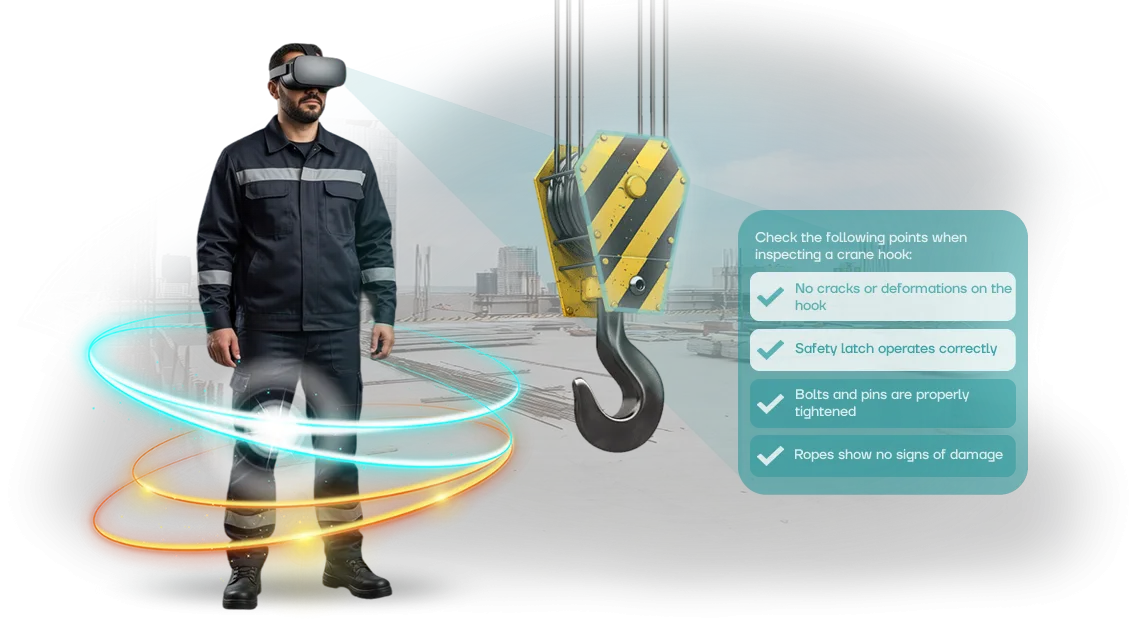
Injuries and Fines: Why Regular Briefings Don't Work
Workplace injuries are not just an employee's pain — they're also direct losses for the company: fines from supervisory authorities, downtime, and loss of reputation.
Regular briefings and posters don't build lasting skills — the employee formally checks off the requirement but acts out of habit in a stressful situation.
That's why modern companies are switching to health and safety VR — immersion in a safe yet realistic environment where a mistake doesn't cost a life.
Each incident brings significant direct costs, plus rising insurance premiums and unscheduled inspections by regulatory agencies. And if a serious accident occurs, the enterprise may get a ban on operating a workshop or even lose its license.
Most injuries, meanwhile, are the result of human factors: a hazard isn't recognized in time, actions aren't drilled to automaticity.
Traditional briefings overload memory with theory but don't provide practice. The employee listens to a lecture, watches a video, signs the logbook — and a week later doesn't remember the details.
Safety is decided in a specific moment: during equipment rounds, in an emergency, when choosing an evacuation route.
We develop VR simulators that model real production scenarios and teach employees to act without health risks. This isn't just delivering information — it's practicing skills to automaticity.
The employee sees the consequences of their decisions in a safe environment and transfers correct behavior into real life. The result — fewer injuries, lower fines, a stronger safety culture.
What Results You'll Achieve with VR Simulators
Occupational safety is not an expense item but a manageable profit factor. VR simulators turn training into a business tool: fewer injuries, lower fines, higher engagement.
Reduced Injury Rate
Employees practice dangerous scenarios in a safe environment, so they act more confidently on the real production floor. Companies using such simulators cut accidents by 40–60% in the first year alone.
Savings on Fines and Downtime
A fine can be substantial, and downtime from an injury costs even more. A trained employee means fewer orders, fewer unscheduled inspections, and fewer lost shifts.
Employee Engagement
VR holds attention better than lectures: new hires complete the briefing without boredom, experienced workers refresh their knowledge with interest. When employees are engaged, the material is truly remembered rather than becoming a formal checkmark in the logbook.
Care as an Employer Brand
A company that invests in safety attracts valuable specialists and earns the trust of partners and inspectors. A reputation as a responsible employer becomes a competitive advantage in the battle for talent.
Each of these effects is measurable: we record metrics before and after implementation so you can see the return on investment in concrete numbers.
Health and Safety VR Formats for Your Enterprise
Different occupational safety tasks require different learning approaches: sometimes a quick knowledge refresh is enough, and sometimes actions in an emergency need to be drilled to automaticity.
We select health and safety VR formats based on your enterprise's specific tasks — by duration, number of participants, and depth of immersion.
This lets you avoid overpaying for excessive features while still getting measurable results: reduced injuries, greater employee confidence, and readiness for emergencies. Below are typical scenarios our clients use most often.
Formats for Your Enterprise's Tasks
| Format | For Whom | What It Delivers |
|---|---|---|
| Short scenarios (5–10 minutes) | For regular briefings and mass training | Quick review of key rules, coverage of all employees in a short timeframe |
| Full immersion (15–30 minutes) | For practicing complex emergency situations | Lasting skill for acting without risk to life and health |
| Team training | For departments working together | Coordinated actions, understanding of roles and responsibilities in emergencies |
| Individual training with feedback | For personnel with different skill levels | Adaptation to the employee's pace and detailed error analysis at the end |
| Group training with an instructor | For briefings in small groups | Live discussion of typical mistakes, saving instructor time |
Formats are easy to combine: for example, short scenarios for everyone and full immersion for employees in hazardous areas. We'll help you choose the optimal set for your specifics and budget, and if needed, develop unique VR scenarios for your regulations.
How the Launch of Occupational Safety Simulators Works in 7 Steps
We've structured the simulator launch as a managed process: you understand what happens at each stage and can make changes while it's still cheap. The result — a working tool that quickly pays for itself through reduced injuries and training costs.
-
Brief and task immersion. You tell us about your employees, production specifics, and frequent risks. We ask clarifying questions so the scenario solves your specific problem rather than being an abstract program.
-
Work process audit. We study occupational safety instructions, regulations, and real situations at your sites. This lets us build into the simulator exactly the scenarios your people encounter.
-
Plan and estimate development. We document the scope, timeline, and cost so you can make a decision without hidden charges. At this stage, you get a clear document with key milestones.
-
Scenario approval. We show the scenario description before development starts: what steps the employee will take, what mistakes to review, and how to evaluate the result. You adjust the details before we start creating graphics.
-
Simulator development. We build a prototype and progressively add interactive tasks and an assessment system. You receive intermediate builds and see how the product becomes a finished solution.
-
Launch and commissioning. We configure the equipment, install the simulator, and train the administrators. Employees start taking courses, and you see completion and error statistics in the reports.
-
Support and evolution. We stay in touch: update scenarios, add new situations, and help with technical issues. The simulator evolves alongside your requirements.
The entire process takes anywhere from a few weeks to a couple of months, depending on the complexity of the scenarios. You're never left alone with the product: at every step, there's a responsible engineer who drives the solution to the result.
What's Included in the Occupational Safety Simulator Delivery
When you order a VR simulator, you get not just a program but a ready-made solution for employee training. We think through everything so you can launch training immediately, without extra investments or hassle.
The delivery package includes:
- Ready-made VR scenarios based on your regulations — we model the real work situations your employees face, tailored to your production specifics.
- Required equipment — virtual reality headsets and supporting hardware, configured and tested. No need to search for vendors or sort out compatibility.
- Licenses and access — official software, updates, and technical support for the entire period of use.
- Instructions for staff and administrators — clear guides on how to run training, track results, and maintain the equipment.
- Integration with your e-learning system — completion results automatically flow into the main system, and you see the full picture for each employee.
- Training reports — convenient, visual reports: who passed, who didn't, where the errors are, and which topics need to be repeated. All data is ready for regulators.
- Training for your specialists — our engineers brief the staff who will administer the simulators, so you don't need to hire extra people.
- Post-launch support — prompt assistance, scenario updates to reflect regulation changes, and refinements based on your feedback.
In the end, you get a comprehensive product that quickly pays for itself through reduced injuries and downtime. We handle all technical matters — from setup to support — while you focus on the results.
Case Study: How a Plant Cut Injuries in 2 Months
How It Happened
One of our clients — a plant with a continuous production cycle — faced a problem typical of the industry: employees kept getting recurring minor injuries, and standard briefings didn't change their behavior.
Each such situation meant not just sick leave but also line stoppages, lost time, and hidden retraining costs.
Instead of posters and lectures, we proposed immersing employees in a virtual environment where they could safely make mistakes and practice the correct actions.
The simulators modeled real workplaces and emergency scenarios, and training took place right at the client's site — without interrupting production.
The Numbers That Matter
The implementation results showed that VR training pays off quickly. Within two months, the number of minor injuries at the plant dropped by 70%, and introductory briefing time was reduced threefold.
Employees themselves asked for additional scenarios — training stopped being a formality and became a clear skills practice.
The head of the occupational safety service said at the time: "For the first time, I see workers arguing over who gets to train next.
For us, the most important thing is that everyone gets home safe, and VR simulators genuinely deliver on that." After the pilot, the client expanded the program to all workshops and ordered new modules — that's what trust backed by numbers looks like.
We work on professional HTC Vive equipment — it provides a stable, realistic image for any scenario, from working at heights to operating in a smoke-filled room.
What matters isn't the hardware itself but the predictable outcome for your employees: fewer injuries, higher engagement, and clear statistics for management.
How to Choose a Simulator Format for Your Enterprise's Specifics?
Choosing a VR simulator format starts not with technology but with your enterprise's specifics: where risks arise, which employees are taking training, and what actions need to be drilled to automaticity.
There's no universal solution — a simulator for a machine-building shop and one for an oil depot will be built differently, even if both cover the same occupational safety topic.
That's why we don't sell a "boxed product" — we first study your production specifics: real emergency scenarios, site layout, regulations, and training requirements.
Together with your specialists, we identify which skills are critical — for example, safe equipment startup, leak response, or evacuation. Based on that, we select the scenario — from short modules for mass briefings to full immersion for complex and rare operations.
An individual approach matters also because a single enterprise often needs different formats. Newcomers get step-by-step guidance with hints, experienced employees get advanced scenarios with no room for error, and different areas get their own scenarios.
We adapt the simulator to your equipment, layout, and internal standards so employees transfer skills directly into their work rather than learning abstract actions.
In the end, you get not just a VR program but a tool that fits into the shift schedule, reduces training time, and lowers injuries. Tell us about your tasks and production specifics — we'll propose a format that fits you and delivers results.
FAQ About Implementing Simulators
Managers most often ask about budget, timelines, and what happens after launch. We answer briefly and without hidden conditions: implementation doesn't require stopping production, and warranty and support are already included in the project. If you still have questions, we'll discuss them at a consultation.
How much does it cost to develop an occupational safety VR simulator?
The cost depends on the number of scenarios and the level of detail. A typical module is priced individually — the exact cost is calculated after audit — and after the briefing, we give you the precise figure and propose a solution for your budget. This is comparable to the cost of a single workplace accident.
How quickly can we launch training?
A typical project takes 4–8 weeks: brief, scenario, prototype, testing, and installation. The simulator works in a free space or right in the workshop — production doesn't need to stop.
What if the equipment breaks down?
We provide a warranty on the simulator and equipment and support the project after launch. If something fails, we update it remotely or come to your site. Repairs usually take 1–2 days.
Who will maintain the simulator?
Our engineers keep the system in working order: they update scenarios, monitor completion statistics, and warn about potential issues in advance. All your team needs to do is put the simulator on the training schedule.
Get a Cost Estimate for a Simulator for Your Company
A VR simulator is a way to prevent an accident — not just "pretty 3D graphics." An employee's mistake on the production floor costs more than any training: downtime, fines, and reputational risks.
We develop simulators for your scenario and hazardous areas — not off-the-shelf demos — so your employees practice exactly the risks that exist at your site.
We'll calculate the simulator cost in 2–3 days. All we need is the training scenario and the number of employees — from there, we'll prepare a proposal that fits your budget.
Why companies choose us:
- More than 40 employee training projects delivered — from industrial sites to logistics centers.
- Full turnkey cycle: scenario, 3D models, instructor instructions, and LMS reports for regulators.
- We fix the price in the contract — no hidden surcharges for "extra hours" or "scene complexity."
- We guarantee the result: if the simulator doesn't run on your equipment, we'll refine it at our own expense.
- We'll build the simulator in 4–8 weeks, with staged deliveries every sprint.
To get an estimate, send us:
- Your production's scenario or occupational safety instructions.
- The number of employees who will take the training.
- Format preferences: virtual reality headset, computer lab, or a hybrid option.
What you'll get after your request:
- An exact commercial proposal with the price fixed in the contract — cost calculated after audit.
- A solution presentation with examples of similar projects and scenario descriptions.
- Solution architecture and a list of required equipment.
- A demo prototype: a test scene with basic training mechanics before full payment.
- Training cost savings calculation per employee.
- A dedicated manager who handles your project until launch.
Leave your request for an estimate — and within 2–3 days, you'll know the exact simulator cost and implementation timeline. After that, it's your decision.